Incoming and outgoing mail
What receiving at your alias and sending from it each involve, the DNS records each one needs, and the 3 ways Mailyoto sends.
Updated 29 October 2026
Forwarding brings email sent to your alias, such as amina@lunavera.com, into an inbox you already use.
Sending is the other direction: email that is sent from your alias and shows it as the sender.
You set up forwarding and sending separately.
You can use forwarding without ever sending.
How each one works#
| Forwarding | Sending | |
|---|---|---|
| What it does | Delivers email for your alias to its destinations | Sends email from an address on your domain |
| Plans | Free, Pro and Max | Pro and Max |
| DNS records | 2 MX records and 1 SPF record | The same SPF record and 2 DKIM records, plus a DMARC record we recommend |
| Where in the dashboard | Your domain’s Forwarding tab | Your domain’s Sending tab |
| Monthly allowance | 5,000 forwarded emails on Free, 60,000 on Pro, 180,000 on Max | 5,000 sends on Pro, 15,000 on Max |
Your domain’s DNS tab lists every record in 2 tables, Forwarding and Sending, and marks each one with a tick or a cross. On the Domains page, each domain has a Forwarding pill and a Sending pill, each with a tick or a cross.
The DKIM records let Mailyoto sign what you send with your own domain. To add them, see Setting up DKIM.
3 ways to send#
The Sending tab has a section for each.
| Reply from your alias | SMTP sending | Send with the API | |
|---|---|---|---|
| Who it reaches | Only people who have emailed that alias | Anyone | Anyone |
| Setup | None in your mail app | A credential, added to each mail app | An API key, used in your own code |
| Works from | Any mail app, including phone apps | Mail apps that let you set the outgoing server | Your website or service |
Replies, API sends and SMTP sends count toward the same monthly sending allowance.
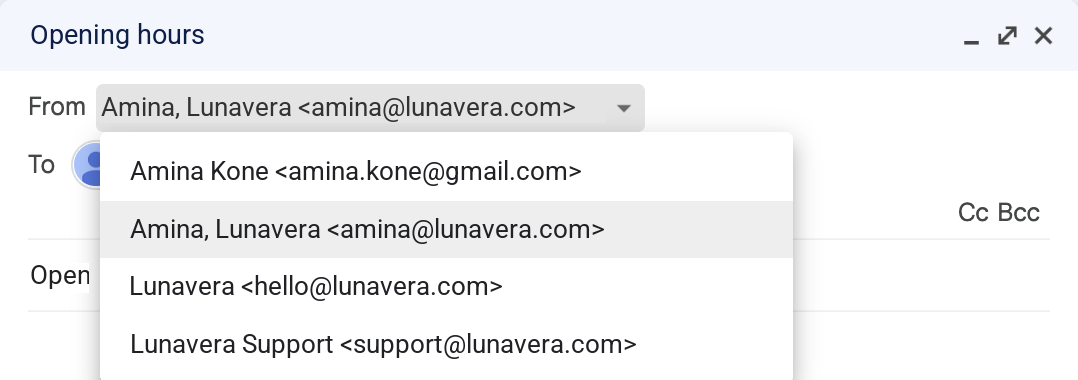
With SMTP sending, your mail app lists your aliases next to your own address, and you choose one in the From field.
Which one to use#
- You respond to people who write to your alias. Use reply from your alias. It works in any mail app with nothing to set up.
- You start conversations, or write to people who haven’t emailed you. Use SMTP sending in your mail app.
- Your website or service sends email. Use the API.
You can use all 3 on the same domain.