Resend a failed email
Send a permanently failed forwarded email to its destination again, once you have fixed the cause.
Pro or Max plan Updated 29 October 2026
When a forwarded email fails permanently, you can fix the cause and send it to that destination again from your logs.
Before you start
- The Pro or Max plan. On Free, the entry says “Resending failed email is available on paid plans.”
- An entry in Logs with the status Failed, whose last event is Failed or Returned.
-
Fix the cause#
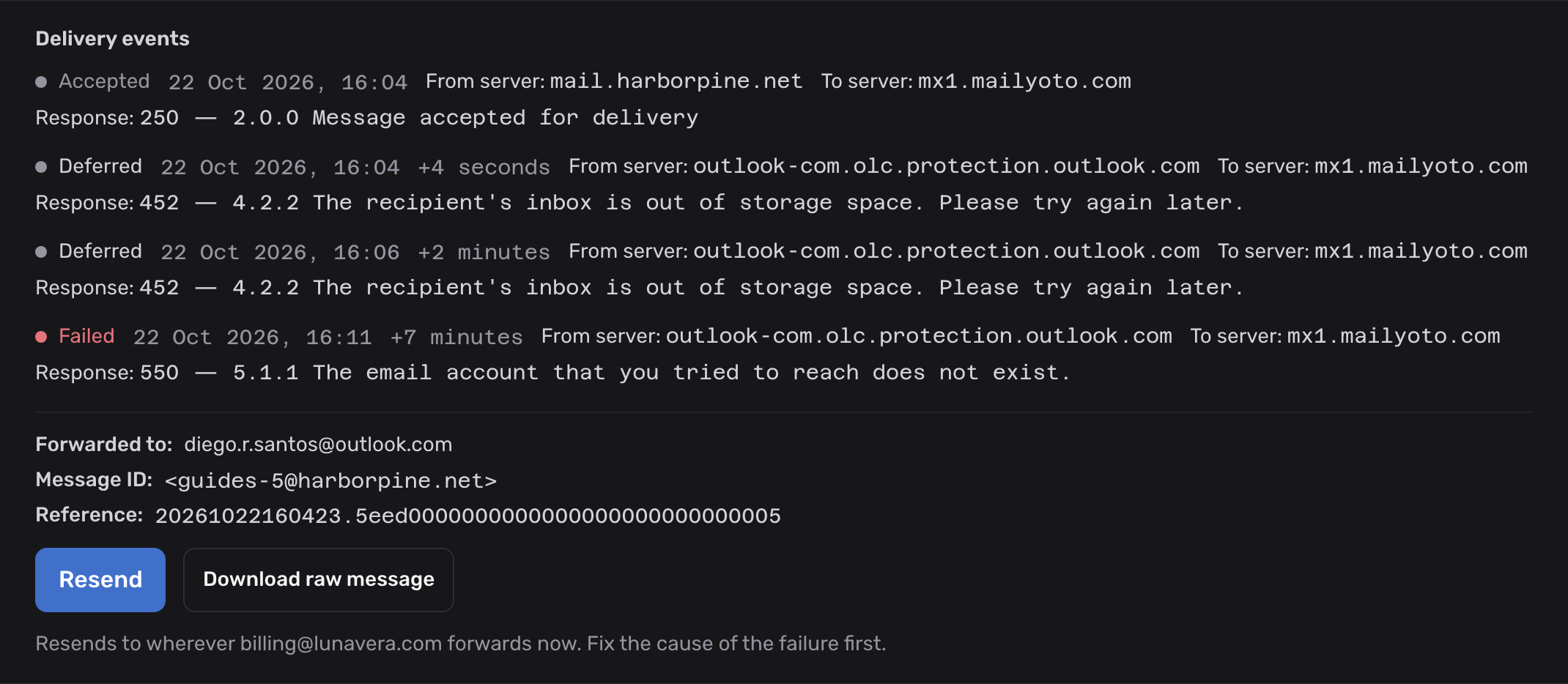
Open the entry’s details and read the Response line of the last event. It says why the destination refused the email.
Fix that first. For example, free up space in a full mailbox. If Blocked destinations at the top of the same tab lists the destination, remove it there.
-
Select Resend#
In the entry’s details, select Resend. The hint next to it names where the email will go.
There is no confirmation step. The details then say “We queued the resend. It appears as a new log entry.”
-
Check the new entry#
The resend has its own entry in Logs, with its own status. Its details say “This is a resend of an earlier message.” Select Show the original to open the failed entry.
On the original entry, Show the resend leads the other way.
Which entries you can resend#
You can resend a forwarded email whose last event is Failed or Returned. Mailyoto has stopped trying to deliver those.
You can’t resend:
- An entry that is Retrying. Mailyoto is still trying it. If it fails permanently, you can resend it then.
- An entry with a Rejected event. Mailyoto turned that email away when it arrived.
- Email you sent through SMTP or the API.
- An entry you have already resent. You can resend each entry once.
Where the resend goes#
Each destination of an alias has its own entry. A resend goes only to the destination of the entry you resend. The alias’s other destinations don’t get another copy.
The alias must still forward to that destination. If you removed the address from the alias, or corrected a misspelt one, Mailyoto refuses the resend and names the address. A corrected address is a new destination. Ask the sender to send the email again.
Problems#
“We no longer have a copy of this message. You can't resend it.”
Resend needs the copy Mailyoto keeps while Keep the full content of failed email is on, and Mailyoto deletes that copy with the log. Turn the switch on under Account → Email logs so that you can resend later failures. Ask the sender to send this one again.
“You already resent this message.”
You can resend each entry once. If the resend failed too, open the resend’s own entry and fix its cause.
A blocked destination stops the resend
A destination that refused email may be under Blocked destinations on the Forwarding tab. Fix the mailbox, lift the block, then resend.
A paused or frozen alias stops the resend
Resume the alias on the Forwarding tab first. See Pause an alias. Mailyoto freezes aliases and domains above a smaller plan’s limits, and can’t resend to them until they are back on.
The domain has routing rules
Resend works for aliases only. A domain with an active rule can’t resend failed email, since a rule may have sent the original elsewhere.