Blocked destinations
Why Mailyoto stops forwarding to an address that refuses email, which aliases a block affects, and how to lift it.
Updated 31 October 2026
When a destination refuses email, Mailyoto may stop forwarding to it for a while. A block lifts on its own, after a delivery test passes, or when you remove it.
Before you start
- Any plan.
- The destination’s mailbox works again: it has space, or the address exists. Otherwise the next email blocks it again.
-
Find the blocked destination#
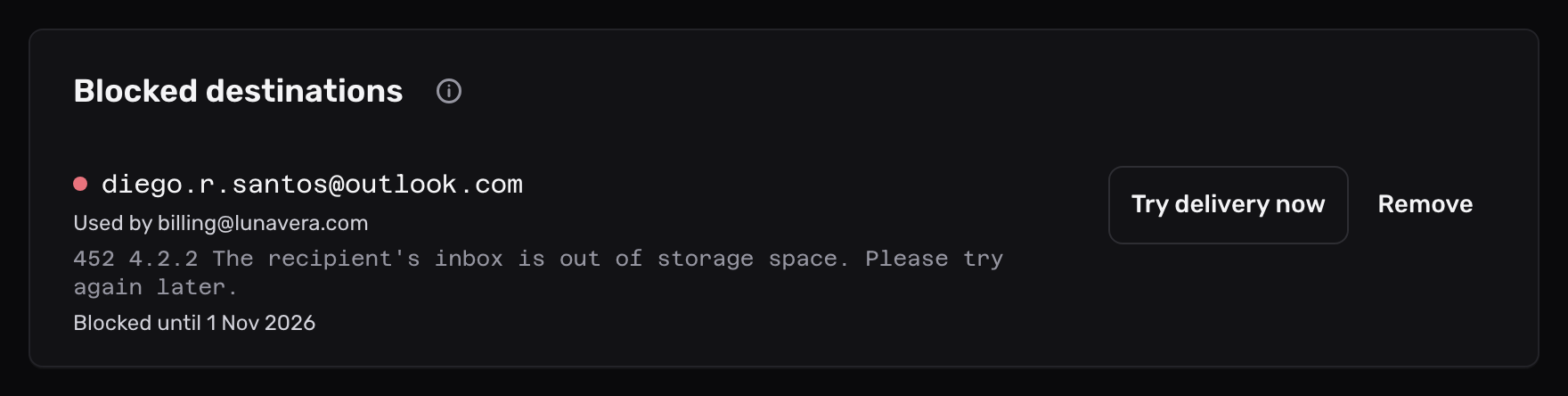
Open Domains, select the domain, then select its Forwarding tab. While an address is blocked, Blocked destinations leads the tab. The email Mailyoto sends you about a block links to it.
Each row shows:
- the blocked address;
- the aliases and rules that forward to it, after Used by;
- the destination server’s latest response;
- when the block lifts.
In the alias list below, each alias that forwards to the address shows 1 blocked destination under its name, and a red dot marks the address.
-
Lift the block#
- On a block that shows Blocked until a date, select Try delivery now. Mailyoto sends the address a test email. When the destination accepts it, the block lifts and the row goes, usually within a minute.
- On a block that shows Blocked until you remove it, select Remove. There is no confirmation step. Delivery resumes at once.
Remove also lifts a block that shows a date.
-
Get the missed email#
Mailyoto doesn’t send again the email that failed during the block. On the Pro or Max plan, resend it from your logs. Otherwise, ask the sender to send it again.
Check that it worked#
The address no longer shows under Blocked destinations, and the list goes once no block is left. The next email to the alias shows Delivered for that destination on the domain’s Usage and logs tab.
Why an address gets blocked#
| Block | Starts when the destination | Lifts |
|---|---|---|
| Temporary | responds that its mailbox is full or out of storage | after 72 hours, or once a delivery test passes |
| Permanent | refuses the address as unknown | when you remove it |
A reply about the receiving server’s own disk, such as 452 4.3.1 Insufficient system storage, doesn’t block the address. Mailyoto retries that email instead.
A block applies to that destination only:
- Email to the alias still reaches its other destinations.
- On the Usage and logs tab, the blocked destination gets a Rejected event, and the email shows as Failed if no destination is left.
The event’s Response line says which kind of block it is:
- Temporary:
450 4.2.0 The destination <amina.kone@gmail.com> is refusing mail for now. Try again later. - Permanent:
550 5.2.0 We stopped forwarding to <amina.kone@gmail.com> after it refused mail permanently.
When every destination of an alias is blocked and at least one block is temporary, the sender’s server gets the temporary response. It tries again later, and the email arrives if the block ends while that server is still trying.
This is not the same as blocking a sender. To stop email from someone, see Blocking one sender.
Delivery tests#
- From 24 hours into a temporary block, Mailyoto tests the address once a day while email for it is waiting.
- Try delivery now sends a test at once. Each address gets 1 test every 5 minutes.
- The test arrives as “Mailyoto delivery test” from
delivery-test@yotosend.com. - Mailyoto never tests a permanent block.
The email about a block#
Mailyoto emails the domain’s notification address within minutes of a block, or the account’s email when the domain has none.
- A single email covers every new block on the domain.
- Each address gets at most 1 email a day.
Problems#
The address comes back on the list
Delivery to it failed again. Open the latest entry on the domain’s Usage and logs tab and read the Response line. Fix the mailbox, or change the alias’s destination on the Forwarding tab.
Try delivery now leaves the block in place
The destination refused the test, or hasn’t responded yet. The row shows its latest response. Fix the mailbox, then try again after 5 minutes.
The address isn't on the list, but its log entries say Rejected
Another cause refused the email, such as the spam check. The Response line names it. See email is not arriving.