Hard and soft bounces
What a hard bounce and a soft bounce mean in your logs, how Mailyoto retries, and what to do about each.
Updated 29 October 2026
A bounce is a destination’s server refusing an email that Mailyoto tried to deliver.
A soft bounce is temporary: the server may accept the email later. A hard bounce is permanent: the server won’t accept it.
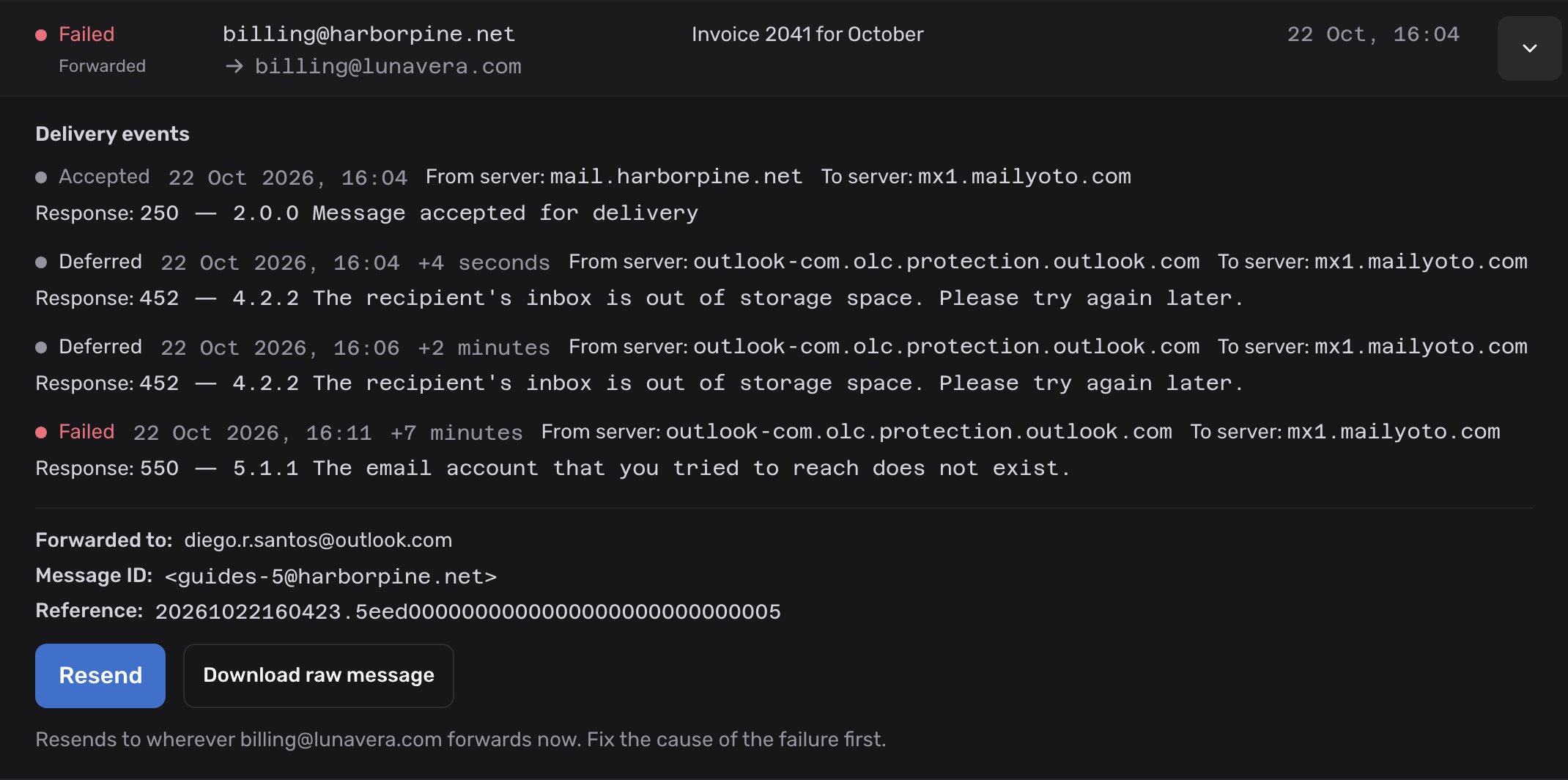
In your logs, a soft bounce is a Deferred event, and a hard bounce is a Failed event.
How Mailyoto handles each#
Mailyoto reads the response the destination’s server sends back, and decides from its code and text whether the refusal is temporary or permanent.
| In the entry’s events | Status in the list | What Mailyoto does |
|---|---|---|
| Deferred | Retrying | Tries again later. |
| Failed | Failed | Stops trying, and emails the sender a notice. |
| Returned | Failed | The server accepted the email, then sent a bounce report later. Mailyoto passes the report on to the sender. |
| Rejected | Failed | Not a bounce. Mailyoto turned the email away when it arrived, and the sender’s server got the refusal. |
Retries after a soft bounce#
After a soft bounce, Mailyoto tries again 2, 5, 30, 120 and 720 minutes after each failure. That makes 6 attempts over about 14.6 hours.
If the last attempt fails too, the entry ends with a Failed event.
Some destinations refuse the first attempt from any new sender and accept a later one. The retries cover that.
The notice to the sender#
When an email to an alias with 1 destination fails permanently, Mailyoto emails the original sender:
- From:
no-reply@bounces.mailyoto.net - Subject: “Message not delivered”
- It begins: “Your message could not be delivered. The receiving server rejected it permanently, so no further attempts will be made.”
Common causes#
| Cause | Usually | What to do |
|---|---|---|
| The destination mailbox is full | Soft, sometimes hard | Free up space. Mailyoto blocks the address for 72 hours, or until a delivery test passes. See blocked destinations. |
| The destination’s server is busy or down | Soft | Nothing. The retries usually deliver it. |
| The destination address doesn’t exist | Hard | Correct the destination on the alias. Mailyoto usually blocks the address. |
| The destination refuses the email as spam | Hard | See forwarded mail that lands in spam. |
| The email is too large for the destination | Hard | Ask the sender to share large files as a link. |
The Response line in the entry’s details quotes the server’s reason. Read it before you change anything.
What to do next#
- Remove a blocked destination once its mailbox works again.
- Resend the failed email on the Pro or Max plan.
- To find other failures, see Trace an email in your logs.
- See the delivery error codes for the refusals Mailyoto itself sends.