Save an email as an .eml file
Get the full copy Mailyoto stored of an email, to open in a mail app or read its source.
Updated 31 October 2026
When you finish, you have the complete message, as Mailyoto received it, saved as a file.
Before you start
- Any plan. Downloading is not limited to paid plans.
- Keep the full content of failed email on before the email arrived. The steps below show where.
-
Keep the full content of failed email#
Open Account in the sidebar, then the Email logs tab. Turn on Keep the full content of failed email, then select Save log settings.
That switch applies to every domain without log settings of its own. To set one domain only, open the domain’s Usage and logs tab, turn on Use different log settings for this domain and the switch under it, then select Save log settings.
The change applies to email that arrives from now on. Email logged earlier keeps the detail it had.
-
Open the entry#
Open Logs, find the email, and select its row to open the details.
-
Select Download raw message#
Select Download raw message. Your browser saves a file named
original.eml.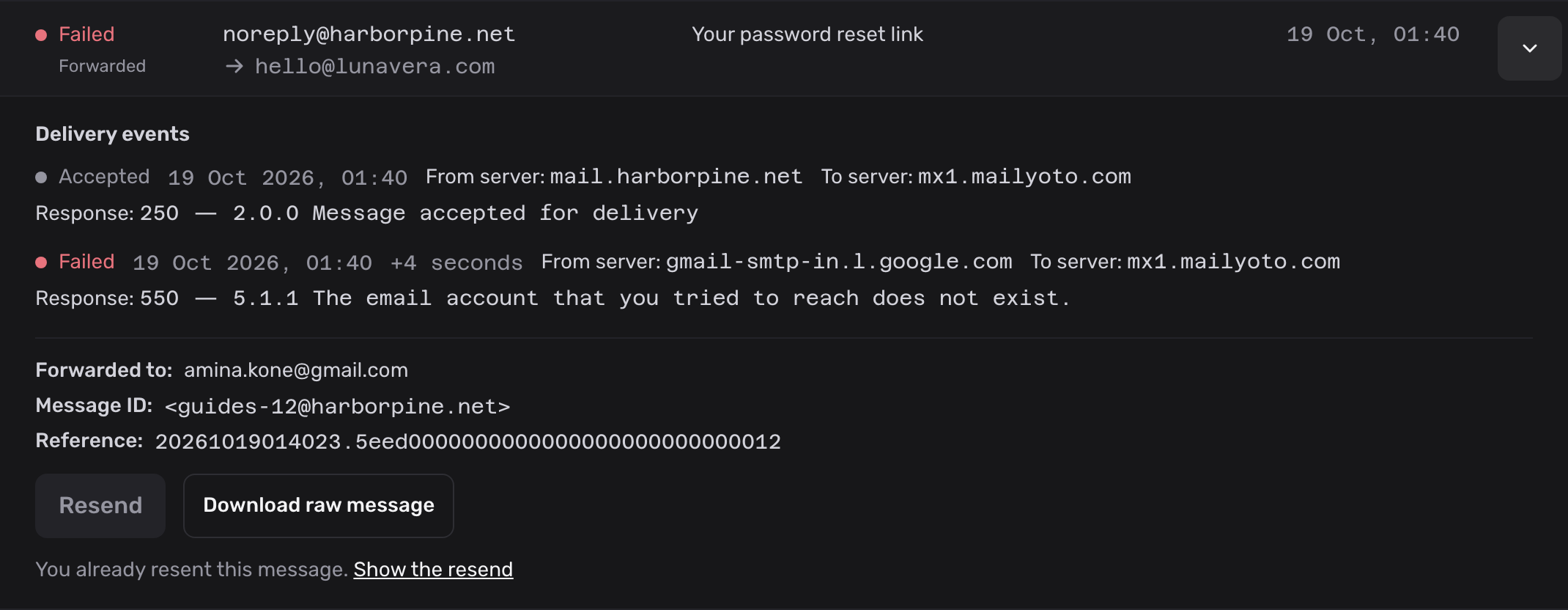
-
Open the file#
Open
original.emlin a mail app such as Apple Mail, Outlook or Thunderbird to read it as an email. Open it in a text editor to read its source, headers included.
What the file holds#
The file is the email as Mailyoto received it from the sender’s server, with its attachments.
It doesn’t include the lines Mailyoto adds when it forwards a copy to each destination. To see those, open the headers in your inbox. See Read message headers.
When Mailyoto keeps a copy#
- Once the destination accepts an email, Mailyoto deletes its copy.
- When an email fails, the copy stays. You can download it, or resend it on a paid plan.
Clear history on a domain’s Usage and logs tab deletes every stored copy for that domain. See Export or clear your logs.
Problems#
There is no Download raw message link
The entry says “We kept no copy of this message.” The email arrived while Keep the full content of failed email was off. Turn it on as in step 1. You can download email that fails afterwards.
The download fails on a delivered email
Mailyoto deleted the copy once the destination accepted the email. The email itself is in the destination inbox, where your mail app can save it.