Navigate DNS tab
What each table, column and mark on a domain's DNS tab means, and what the Check DNS button does.
Updated 29 October 2026
The DNS tab lists the records your domain needs at its DNS provider, and shows whether Mailyoto can see each one. Open it from a domain’s page: Domains, then the domain, then DNS.
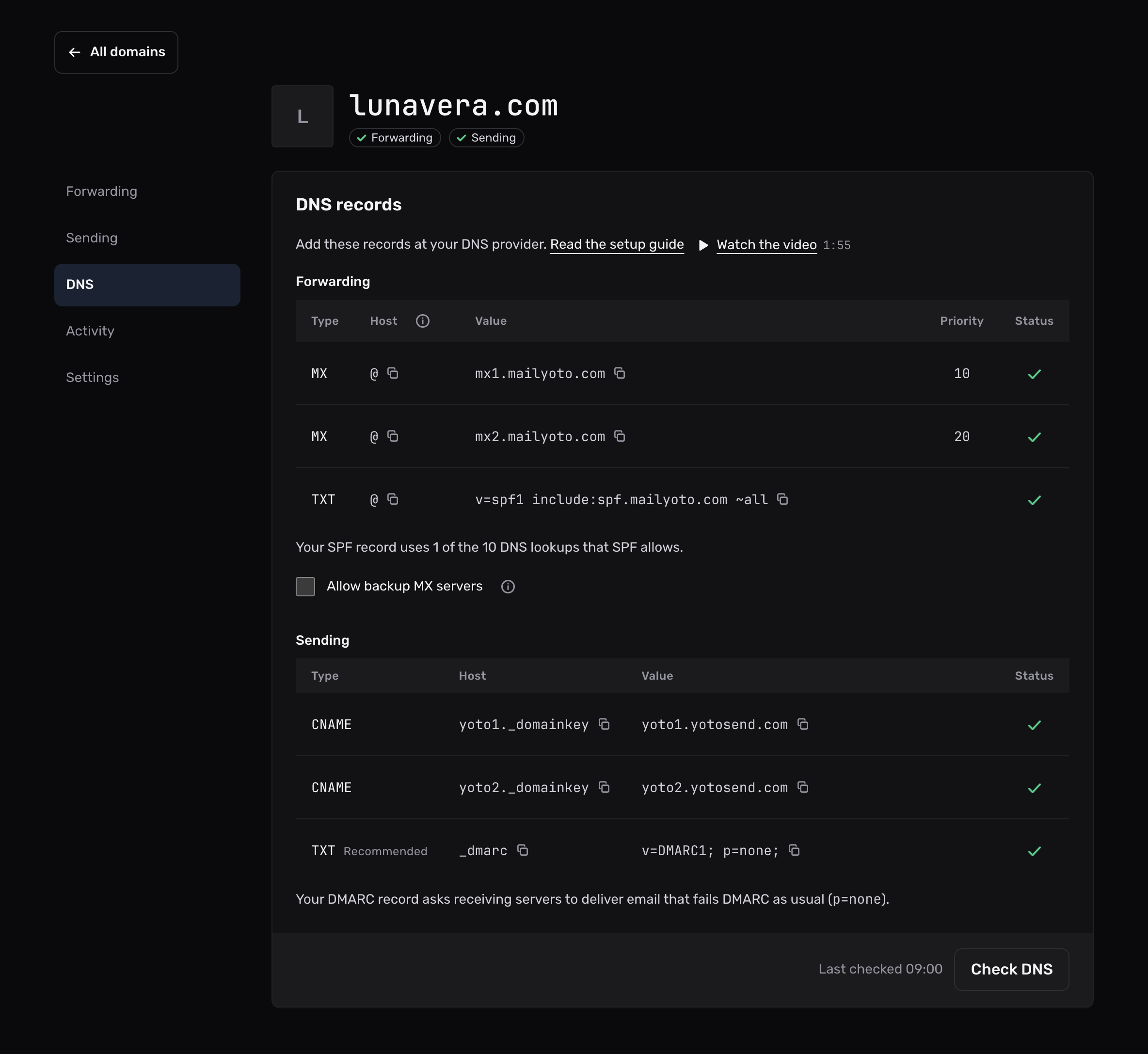
The 2 tables#
Under DNS records, the records come in 2 groups.
| Group | Records | What they do |
|---|---|---|
| Forwarding | MX mx1.mailyoto.com, MX mx2.mailyoto.com, TXT v=spf1 include:spf.mailyoto.com ~all | Bring your email to Mailyoto. All 3 are needed for forwarding. |
| Sending | CNAME yoto1._domainkey, CNAME yoto2._domainkey, TXT _dmarc | Sign the email you send from your domain. Shown on Pro and Max only. |
In the Sending table, the DMARC row carries the note Recommended: it helps your sent email, and Mailyoto doesn’t need it to verify anything. Setting up DKIM and Setting up DMARC cover the sending records.
The columns#
| Column | What it holds |
|---|---|
| Type | The record type to choose at your DNS provider: MX, TXT or CNAME. |
| Host | The name to enter. @ stands for the domain itself. If your provider refuses @, leave the field blank or enter the domain name. |
| Value | The value to enter, exactly as shown. |
| Priority | MX records only. It appears in the Forwarding table only: 10 for mx1, 20 for mx2. |
| Status | Whether Mailyoto found the record. |
Select a host or a value to copy it. A short confirmation tells you it’s on your clipboard. On a phone, each record shows as a list of fields instead of a table row.
Ticks and crosses#
Each record shows a tick when Mailyoto finds it, or a cross when it doesn’t. Screen readers announce them as Found and Not found.
A record gets a tick when Mailyoto reads the same value from DNS:
- An MX record needs priority 10 or 20. Mailyoto does not accept other numbers.
- The SPF record needs to start with
v=spf1and includespf.mailyoto.com. Other includes may stay in the same record. - A DKIM record needs to point exactly at its target. A trailing dot doesn’t matter.
When the MX records are wrong and the domain has other MX records, the tab lists them under “Your current MX records”. Delete those at your DNS provider. To keep them on purpose, select Allow backup MX servers under the Forwarding records. The list then goes away, and the MX check needs both Mailyoto MX records (how it works).
SPF lookups and the DMARC policy#
After each check, a line under the Forwarding table says how many DNS lookups your SPF record uses, out of the 10 that SPF allows.
Each include:, a, mx, ptr and exists in the record costs 1 lookup. Lookups inside an include count too.
Past 10, the line turns red.
Receiving servers then treat the record as broken, and no email from your domain passes SPF.
Stay under the lookup limit explains how to remove lookups.
On Pro and Max, a line under the Sending table says what your DMARC policy asks receiving servers to do with email that fails DMARC: deliver it as usual, put it in the spam folder, or refuse it.
The line also says when the policy covers only part of that email (pct), or when subdomains have a policy of their own (sp).
Each line appears only for a record the check could read.
Check DNS#
The tab checks the records each time you open it. To check again after a change, select Check DNS. The time of the last check appears next to the button.
When the forwarding records are all found for the first time, a message confirms that the domain is verified. Mailyoto also checks every domain every hour. Domain status explains when.
With a white-label domain#
On Pro and Max, a white-label domain replaces mailyoto.com in your MX and SPF values with your own names.
The tab then shows the records with those names, and links to the domain’s Settings tab for the extra CNAME records the white-label domain needs.