A DNS record still shows a cross
Compare each record with the DNS tab, then work through the common causes, from the wrong DNS provider to an old DNSSEC setting.
Updated 27 October 2026
You added the records, but your domain’s DNS tab still marks one or more of them with a cross, and the Forwarding pill shows a cross.
Why it happens#
Mailyoto marks a domain ready for forwarding when it finds both MX records and the SPF record. DKIM is not needed for forwarding. A record shows a cross when the check can’t read it, or reads a value that differs from the one on the tab.
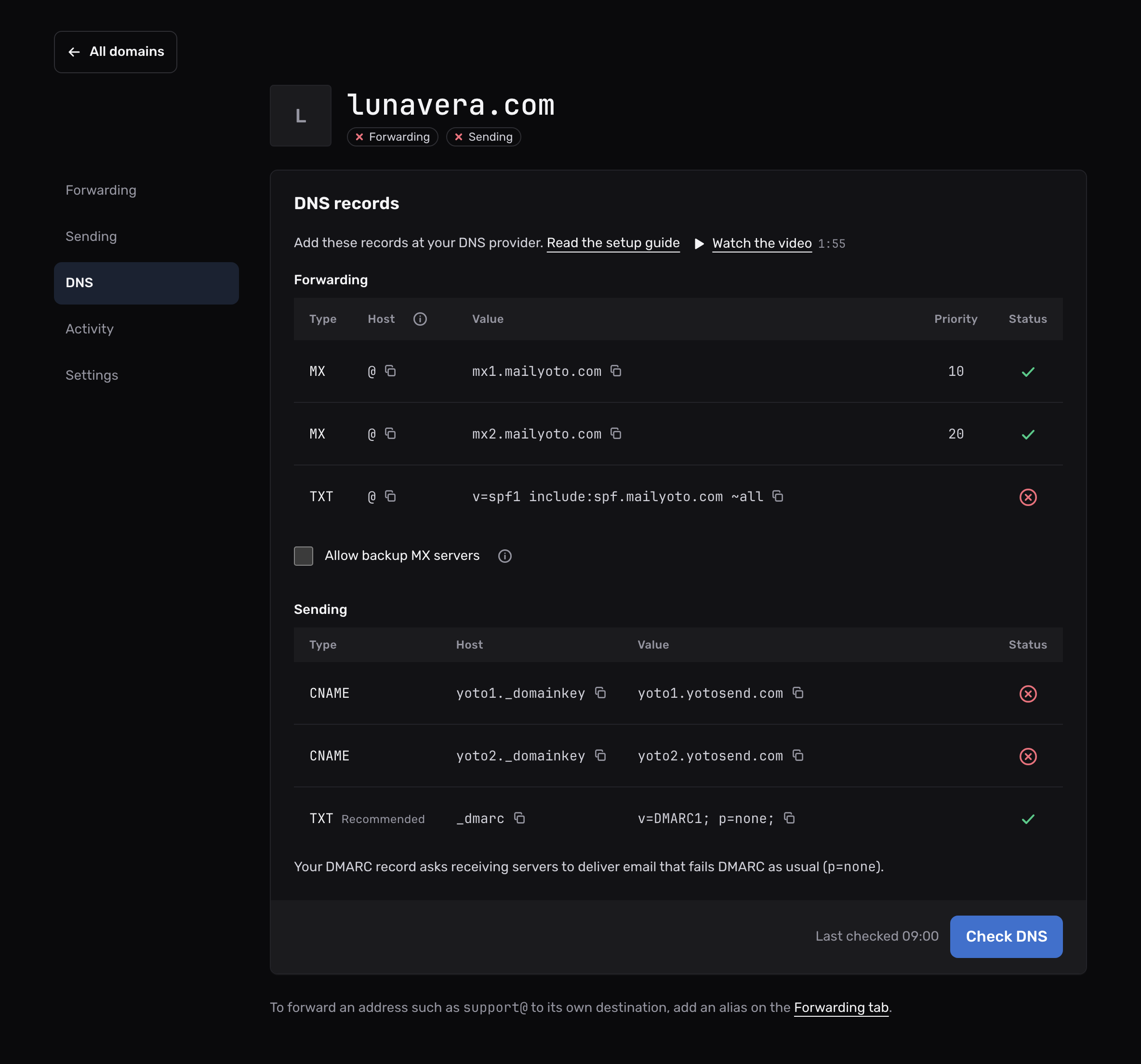
The causes below cover nearly every case.
Fix it#
-
Compare each record with the DNS tab#
Open Domains, choose your domain, then the DNS tab. Check the type, host and value of every row against what you entered at your DNS provider.
- MX, host @, priority 10
- mx1.mailyoto.com
- MX, host @, priority 20
- mx2.mailyoto.com
- TXT, host @
- v=spf1 include:spf.mailyoto.com ~all
-
Work through the causes#
Open each cause below that could apply, and fix it at your DNS provider.
-
Check again#
Back on the DNS tab, choose Check DNS. Mailyoto also checks every domain each day at 02:00 UTC.
Common causes#
The records are at the wrong DNS provider
Records count only at the DNS provider your domain’s nameservers point to. If you bought the domain at one company and run its DNS at another, add the records at the second one. Your registrar’s dashboard shows which nameservers the domain uses.
Other MX records are still there
Mailyoto’s MX records must be the only MX records on the domain.
When there are others, the DNS tab lists your current MX records under the table.
Delete every MX record that isn’t mx1.mailyoto.com or mx2.mailyoto.com.
To keep another provider’s MX on purpose, see Allow backup MX servers.
The MX priorities are different
Give mx1.mailyoto.com priority 10 and mx2.mailyoto.com priority 20.
Other numbers fail the check, even when both hostnames are right.
The domain has 2 SPF records
A domain can have only 1 TXT record that starts with v=spf1.
With 2, both are invalid.
Merge them into one by adding include:spf.mailyoto.com to the existing record, before its final ~all or -all.
Merging SPF records shows how.
The SPF record was flattened
An SPF flattening tool replaces include: entries with the addresses behind them.
The check needs an include: that leads to spf.mailyoto.com.
A flattened record never verifies.
Put the include back.
The host field holds the domain twice
Some DNS providers add your domain to the host you type.
Entering lunavera.com there creates a record for lunavera.com.lunavera.com.
If your DNS provider rejects @ as the host, leave it blank or enter the domain name, as the tab’s hint says.
The domain uses an old DNSSEC setting
DNSSEC lets resolvers check that DNS responses really come from your DNS provider. It relies on a DS record held at your registrar, which must match the keys of your current DNS provider.
After a move to a new DNS provider, the registrar can still hold the old provider’s DS record. Resolvers that check DNSSEC then refuse to return any of your records. Our check may be one of them, while other mail servers still read your records. Some email then arrives while the tab shows a cross.
To fix it, open your registrar’s DNSSEC settings and do one of these:
- Remove the old DS record, which turns DNSSEC off for the domain.
- Turn DNSSEC on at your new DNS provider, and copy its DS record to the registrar in place of the old one.
Then choose Check DNS.
The records are new
DNS providers take a while to publish a change. Resolvers also keep old results until they expire. Wait, then choose Check DNS again.
Confirm it worked#
Every row on the DNS tab and the Forwarding pill show a tick. Send an email to one of your aliases from another account to see it arrive.