Deliver email to a webhook
Send each email to an alias as a signed JSON request to your own URL, and check on your server that the request came from Mailyoto.
Pro or Max plan Updated 31 October 2026
When you finish, every email to orders@lunavera.com reaches your server as a JSON POST that you can check and act on.
Before you start
- A Pro or Max plan. Webhook destinations and the signing secret are paid features.
- A public URL on your server that accepts a JSON
POST. Mailyoto refuseslocalhostand127.0.0.1.
-
Put your URL in the destination#
Open your domain’s Forwarding tab, then create an alias with Create alias or open an existing one with Edit alias.
In Destinations, enter the URL and press Enter. Add any email addresses that should also get the message the same way. Mailyoto treats an entry that starts with
https://orhttp://as a webhook, and anything else as an email address.- Address
- orders
- Destinations
- https://shop.lunavera.com/hooks/orders, amina.kone@gmail.com
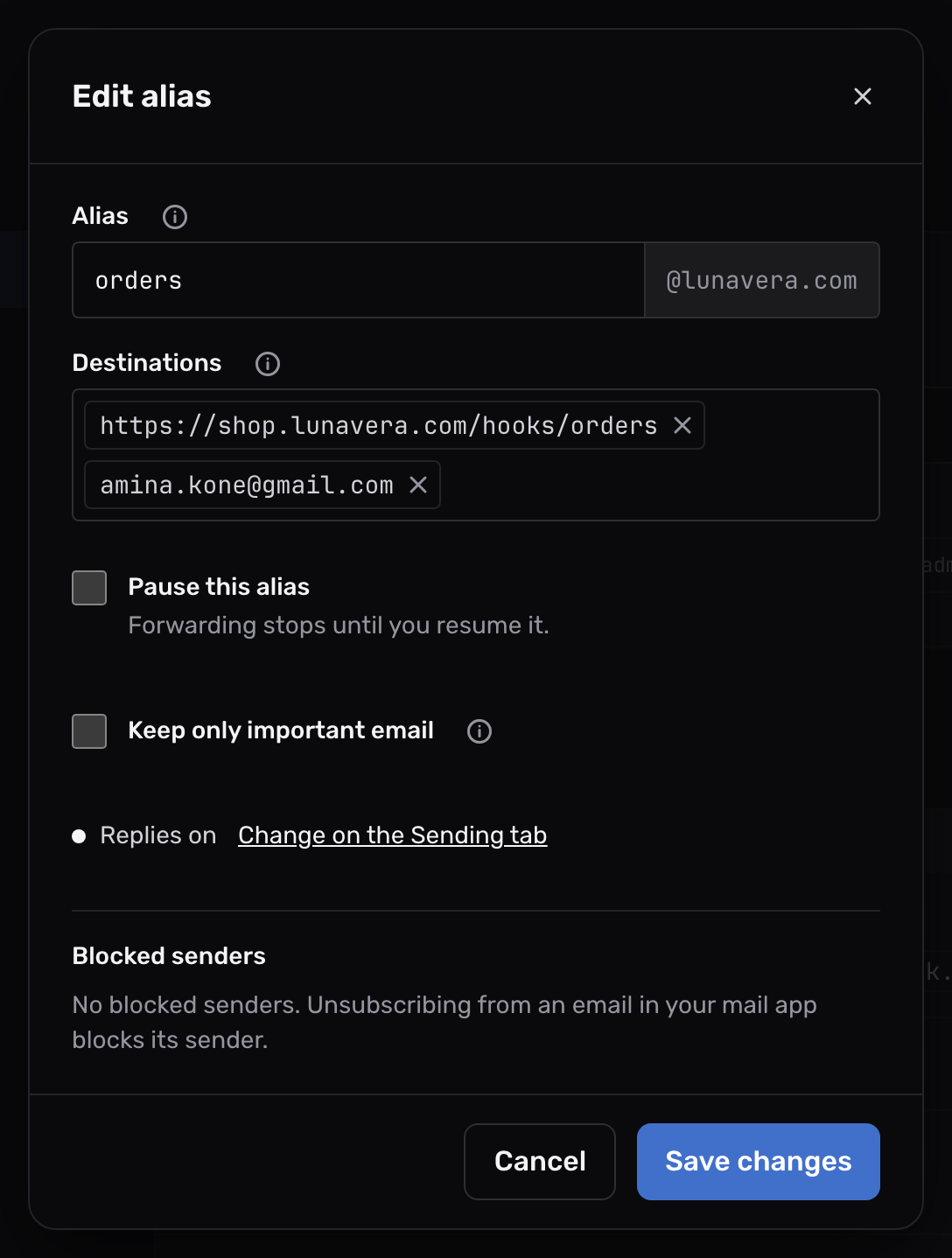
A rule can forward to the URL too: choose Forward under Then and enter the URL as a destination.
-
Copy the signing secret#
Open the domain’s Settings tab and find Webhook signing. Select Reveal and copy the Signing secret into your server’s configuration.
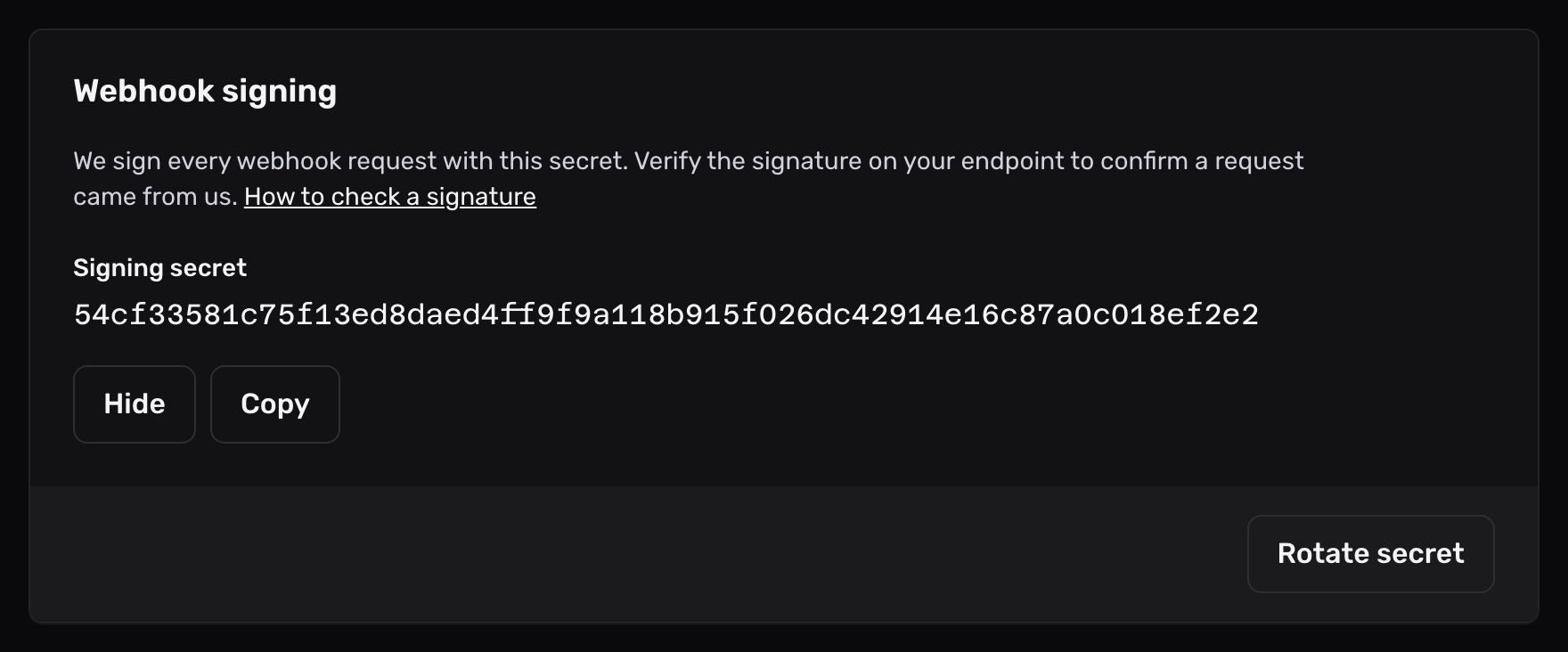
Each domain has its own secret. Keep it on the server only.
-
Send a test#
On the Forwarding tab, use Send test (the paper plane) on the alias.
Open Logs. A delivery your endpoint accepted reads
250 Endpoint accepted it with HTTP 200., with the status your endpoint sent.
Important
Use an https:// URL. Mailyoto also accepts http://, but then the email crosses the internet unencrypted.
What your endpoint receives#
Each request is a POST with a JSON body that holds one email. It carries these headers:
| Header | What it holds |
|---|---|
Content-Type | application/json |
User-Agent | mailyoto-webhook/1.0 |
Mailyoto-Timestamp, Mailyoto-Signature | The signature of the request. Check that a request came from Mailyoto shows how to verify it. |
The body starts with what Mailyoto knows about the delivery:
| Field | What it holds |
|---|---|
id | The log entry of this delivery. It stays the same on every retry. |
attempt | 1 on the first try, then 2, 3 and so on. |
received_at | When Mailyoto received the email, in UTC (ISO 8601). |
envelope | What the sending server told Mailyoto: mail_from, rcpt_to, helo, client_ip and client_ptr. |
authentication | One entry per check Mailyoto ran when the email arrived. Each has method (dkim, spf, dmarc or arc), result (as in an Authentication-Results header, such as pass, fail, softfail or none) and domain, the domain the check looked at. null for email sent through Mailyoto, which isn’t checked. |
message | The email itself. |
raw_message | The whole original email, base64-encoded, when the URL has include_raw=true. Otherwise null. |
raw_message_url | A link to the original email, https://api.mailyoto.com/v1/domains/<domain>/logs/<log id>/message, when Keep the full content of failed email is on for the domain. Open it with an API key. Otherwise null. |
message always has every field below. Your code never has to check whether a field exists.
| Field | What it holds |
|---|---|
message_id | The Message-ID header without its angle brackets, or null. |
subject | The subject, or null. |
sent_at | The Date header in UTC (ISO 8601). null when the email has no date Mailyoto can read. |
from, sender | An object with name and address, or null. |
reply_to, to, cc, bcc | Lists of name and address objects. Empty when the header is missing. |
text, html | The 2 versions of the body. Either can be null. |
attachments | One entry per file: filename, content_type, size in bytes and content in base64. |
inline_images | The images the HTML shows through a cid: link. Each has the fields of an attachment plus content_id. |
headers | Every header of the email, under its lower-case name. Each value is a list, in the order the headers appear. |
A shortened example:
{
  "id": "log_01m5pf2v9y4b8d1x6s3w0c7nqa",
  "attempt": 1,
  "received_at": "2026-10-23T09:14:05Z",
  "envelope": {
    "mail_from": "diego@harborpine.net",
    "rcpt_to": "orders@lunavera.com",
    "helo": "mail.harborpine.net",
    "client_ip": "203.0.113.7",
    "client_ptr": "mail.harborpine.net"
  },
  "authentication": [
    { "method": "dkim", "result": "pass", "domain": "harborpine.net" },
    { "method": "spf", "result": "pass", "domain": "harborpine.net" },
    { "method": "dmarc", "result": "pass", "domain": "harborpine.net" },
    { "method": "arc", "result": "none", "domain": null }
  ],
  "message": {
    "message_id": "CAF7k2xq81@mail.harborpine.net",
    "subject": "Order 1042",
    "sent_at": "2026-10-23T09:14:02Z",
    "from": { "name": "Diego Ramos", "address": "diego@harborpine.net" },
    "sender": null,
    "reply_to": [],
    "to": [{ "name": null, "address": "orders@lunavera.com" }],
    "cc": [],
    "bcc": [],
    "text": "Two boxes of the blue tiles, please.",
    "html": "<p>Two boxes of the blue tiles, please.</p>",
    "attachments": [
      { "filename": "order-1042.pdf", "content_type": "application/pdf", "size": 48213, "content": "JVBERi0xLjcK..." }
    ],
    "inline_images": [],
    "headers": { "subject": ["Order 1042"], "received": ["from mail.harborpine.net ..."] }
  },
  "raw_message": null,
  "raw_message_url": null
}
Check that a request came from Mailyoto#
Anyone who learns your URL can post to it. Mailyoto signs every request. Your endpoint can then refuse anything Mailyoto didn’t send. Each request carries 2 headers:
| Header | What it holds |
|---|---|
Mailyoto-Timestamp | When Mailyoto sent the request, in Unix seconds. |
Mailyoto-Signature | sha256= and a hex HMAC-SHA256 of the timestamp, a dot and the raw body, keyed with your signing secret. |
To check a request:
- Keep the body as the exact bytes you received. Parsing the JSON and writing it out again changes the bytes.
- Refuse the request if the timestamp is far from your server’s clock. The examples below allow 5 minutes, which stops someone replaying an old request.
- Compute the HMAC-SHA256 of the timestamp, a dot and the raw body, with your secret as the key.
- Compare your result with each
sha256=value inMailyoto-Signature, in constant time. Accept the request if one matches.
Python
import hashlib
import hmac
import time

MAX_AGE_SECONDS = 5 * 60


def is_from_mailyoto(secret, timestamp, signature_header, raw_body):
    """raw_body is the request body as bytes, exactly as received."""
    if abs(time.time() - int(timestamp)) > MAX_AGE_SECONDS:
        return False
    expected = hmac.new(
        secret.encode(), timestamp.encode() + b"." + raw_body, hashlib.sha256
    ).hexdigest()
    return any(
        hmac.compare_digest(expected, entry.strip().removeprefix("sha256="))
        for entry in signature_header.split(",")
    )
In Flask, the raw body is request.get_data(), and the headers are request.headers["Mailyoto-Timestamp"] and request.headers["Mailyoto-Signature"].
Node.js
const crypto = require("node:crypto");

const MAX_AGE_SECONDS = 5 * 60;

// rawBody is the request body as a Buffer, exactly as received.
function isFromMailyoto(secret, timestamp, signatureHeader, rawBody) {
  if (Math.abs(Date.now() / 1000 - Number(timestamp)) > MAX_AGE_SECONDS) return false;
  const expected = crypto
    .createHmac("sha256", secret)
    .update(`${timestamp}.`)
    .update(rawBody)
    .digest();
  return signatureHeader.split(",").some((entry) => {
    const given = Buffer.from(entry.trim().replace(/^sha256=/, ""), "hex");
    return given.length === expected.length && crypto.timingSafeEqual(given, expected);
  });
}
In Express, read the body with express.raw({ type: "application/json" }) so req.body is the raw Buffer. Parse the JSON yourself once the check passes.
Change the secret#
Select Rotate secret under Webhook signing. For the next 24 hours, each request carries 2 signatures, one from the new secret and one from the old. Your endpoint keeps accepting requests while you deploy the new secret. The API can do the same: see the webhook signing secret on the API reference.
Change what the request carries#
Add these options to the URL as query parameters. They apply to that one destination.
| Parameter | Effect |
|---|---|
include_attachments=false | Sends each attachment’s filename, content_type and size, with content set to null. |
include_raw=true | Fills raw_message with the whole original email, base64-encoded. |
skip_spam_check=true | Skips the spam check, but only when every recipient of the email is a webhook with this option. |
https://shop.lunavera.com/hooks/orders?include_attachments=false&include_raw=trueMailyoto refuses spam while the sending server is still connected. A refused email never reaches your endpoint. Use skip_spam_check=true when your own system filters spam.
Responses, timeouts and retries#
| Your endpoint | What Mailyoto does |
|---|---|
Responds 2xx within 20 seconds | Logs the delivery with code 250. |
Responds 400 or 413 | Stops trying, because the same request would fail again. |
Responds 410 | Stops trying, and pauses the webhook. |
Responds 429 or 503 with a Retry-After header | Waits as long as the header asks, or for the next gap if that is longer. |
| Responds with any other status, takes longer than 20 seconds, or can’t be reached | Tries again after the next gap. |
The gaps between tries are 30 seconds, 2 minutes, 10 minutes, 30 minutes, 1 hour and 3 hours, then 6 hours each. Each gap is up to 20% shorter or longer, so emails that failed together don’t all return at once. Mailyoto stops trying 3 days after the email arrived, with a last try at that moment.
Every try is in your email logs. A try that will be repeated has code 451, and its entry shows which try it was and when the next one runs. A delivery that stopped has code 554.
When your endpoint stops working#
Mailyoto pauses every alias and routing rule that delivers to your URL when:
- the endpoint responds
410, or - an email still fails a day after it arrived, and no delivery to the URL succeeded that day.
You get one email that names the paused aliases and rules, and the last response. While an alias is paused, it holds new email for retry, unless you chose Return to sender or Discard quietly for it. A paused rule holds the email it matches for retry. Emails that arrived before the pause keep their tries.
To resume the webhook:
- Make the endpoint respond with a
2xxstatus. - Select Resume on each paused alias and rule in Forwarding.
- On the domain’s Usage and logs tab, resend any email that failed.
Saving the alias says webhooks need a paid plan
Webhook destinations work on Pro and Max. Change your plan under Billing, then save the alias again.
Saving the alias says the URL can't be local
Mailyoto can’t reach localhost or 127.0.0.1 on your computer. Use a public URL, or a tunnel that gives your local server one.
The signature never matches
Check the raw body, exactly as it arrived, before any JSON parsing. Use the secret of the domain the alias belongs to. Check that your server’s clock is right.
An alias or rule with a webhook shows Paused · holding email
Your endpoint responded 410, or failed for a day. The email we sent and your email logs show its last response. Fix the endpoint, then select Resume on the alias or rule.
The same email arrives more than once
Your endpoint took longer than 20 seconds or returned an error. Mailyoto then sent it again. Respond with 2xx first and do slow work afterwards.
Use id to skip an email you already handled. It stays the same on every retry, and attempt counts the tries.